Building Movement and Staggered Starts
This page documents the movement interface in run configs (movement:) and shows
one standardized comparison across all examples.
All scenarios here use:
examples/data_formulation_visitors.csvA faculty catalog matching the number of buildings in the scenario
Movement Configuration
movement:
  policy: none          # or travel_time / nonoverlap_time
  phase_slot:
    BuildingA: 1
    BuildingB: 1
  travel_slots:         # used for policy: travel_time (or "auto")
    BuildingA:
      BuildingA: 0
      BuildingB: 1
    BuildingB:
      BuildingA: 1
      BuildingB: 0
policy: none: no explicit inter-building travel-time constraints.policy: travel_time: explicit pairwise slot lag constraints fromtravel_slots.policy: nonoverlap_time: auto-derive lag constraints from absolute slot timestamps.phase_slot: earliest slot allowed for each building (supports staggered starts).travel_slots: auto: allowed withpolicy: travel_time.min_buffer_minutes: optional nonnegative buffer for auto-derived lags.Prefer explicit
AM/PMor 24-hour slot labels in run configs. Bare labels are still accepted via a visit-day heuristic, but they emit a warning because they are ambiguous.
Examples for Different Building Configurations
Run every scenario and regenerate all movement figures:
python scripts/run_building_configuration_examples.py
This command prints one unified comparison table and writes scenario plots to
docs/_static/movement_<slug>_{visitor,faculty}.png.
Category |
Scenario |
Policy |
Feasible |
Objective |
Assignments |
Requested Assignments |
Group Slots |
|---|---|---|---|---|---|---|---|
Baseline |
One building (no movement) |
|
True |
110.9 |
30 |
30 |
13 |
Baseline |
Two buildings (close, policy=none) |
|
True |
110.9 |
30 |
30 |
13 |
Baseline |
Three buildings (close, policy=none) |
|
True |
110.9 |
30 |
30 |
13 |
Travel lag |
Two buildings (+1 slot travel lag) |
|
True |
110.9 |
30 |
30 |
13 |
Travel lag |
Three buildings (+1 slot travel lag) |
|
True |
103.7 |
28 |
25 |
12 |
Shifted clocks |
Shifted clocks (ABC starts 15 min earlier) |
|
True |
110.9 |
30 |
30 |
13 |
Shifted clocks |
Shifted clocks (XYZ starts 15 min earlier) |
|
True |
110.9 |
30 |
30 |
13 |
Phase slot |
Staggered start (ABC first) |
|
True |
101.8 |
26 |
26 |
11 |
Phase slot |
Staggered start (XYZ first) |
|
True |
94.9 |
24 |
23 |
9 |
Shifted clocks |
Three buildings (10-minute shifted clocks, no breaks) |
|
True |
116.1 |
33 |
31 |
14 |
Interpretation of the close-building equivalence:
In this dataset, one-building, two-close-building, three-close-building, and two-building
travel_time(+1 lag) all attain the same optimum.Practically, that means the added movement constraints are non-binding for this particular demand/availability profile.
The three-building +1 lag case is stricter (more inter-building transition edges), so objective and assignments decrease.
Here are the files used in these examples.
Slug |
Config |
Faculty Catalog |
|---|---|---|
|
|
|
|
|
|
|
|
|
|
|
|
|
|
|
|
|
|
|
|
|
|
|
|
|
|
|
|
|
|
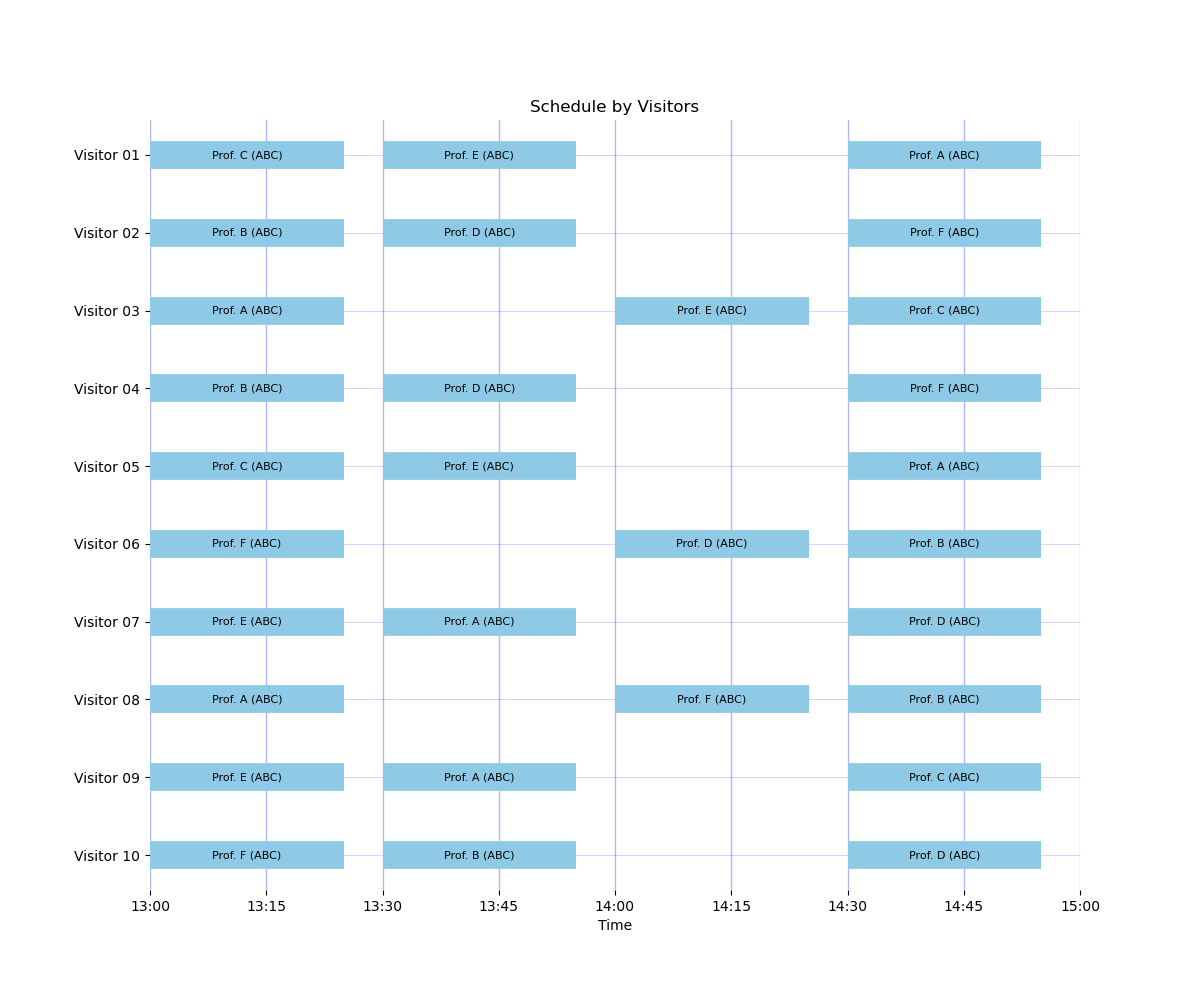
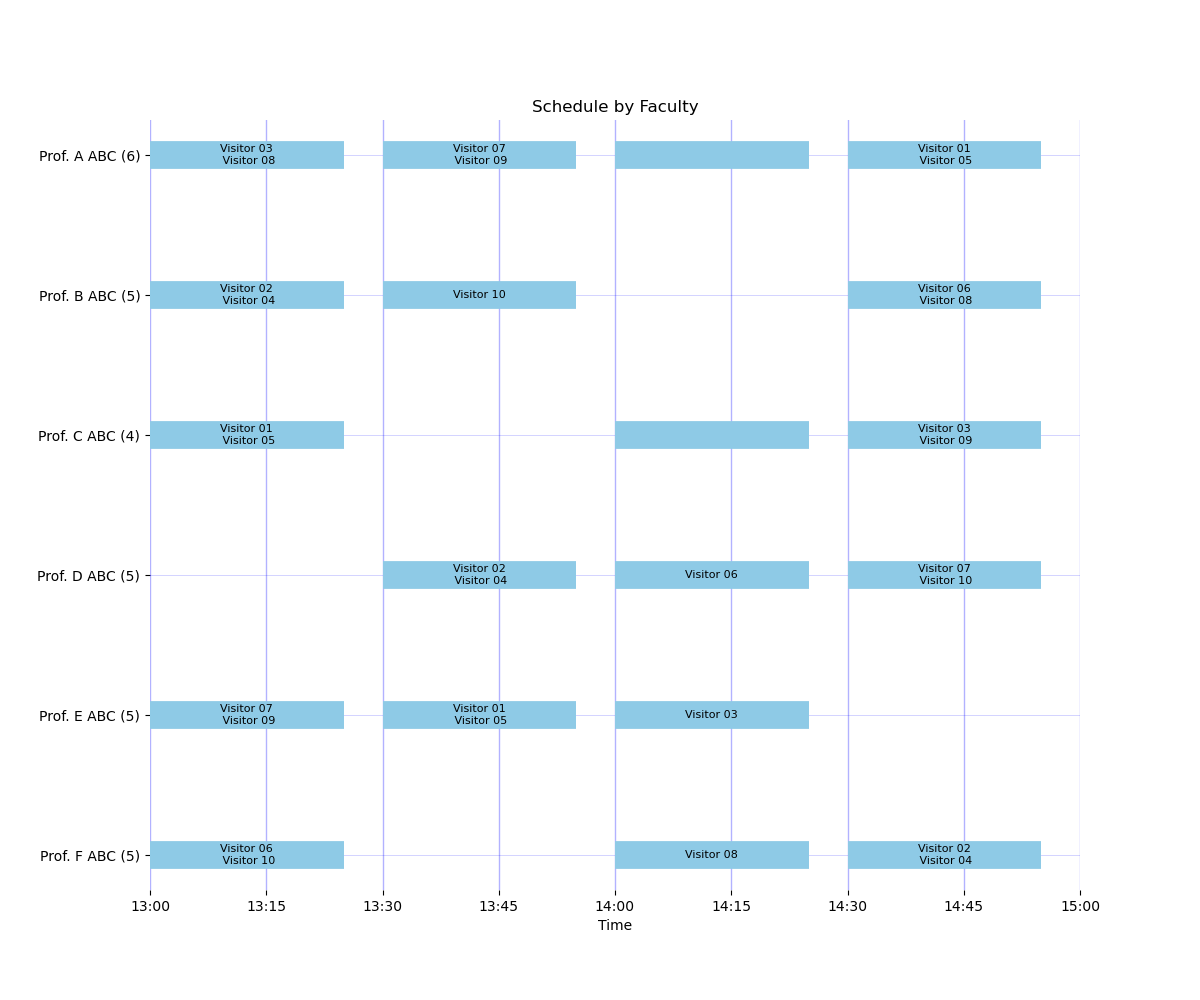
Example 1: One building (no movement)
This is the simplest operational baseline: everyone is in one building, so movement constraints are irrelevant and the model focuses only on preferences and availability.
Configuration:
examples/config_one_building.yamlexamples/faculty_one_building.yaml
Result summary: feasible, objective 110.9, assignments 30, requested assignments 30, group slots 13.
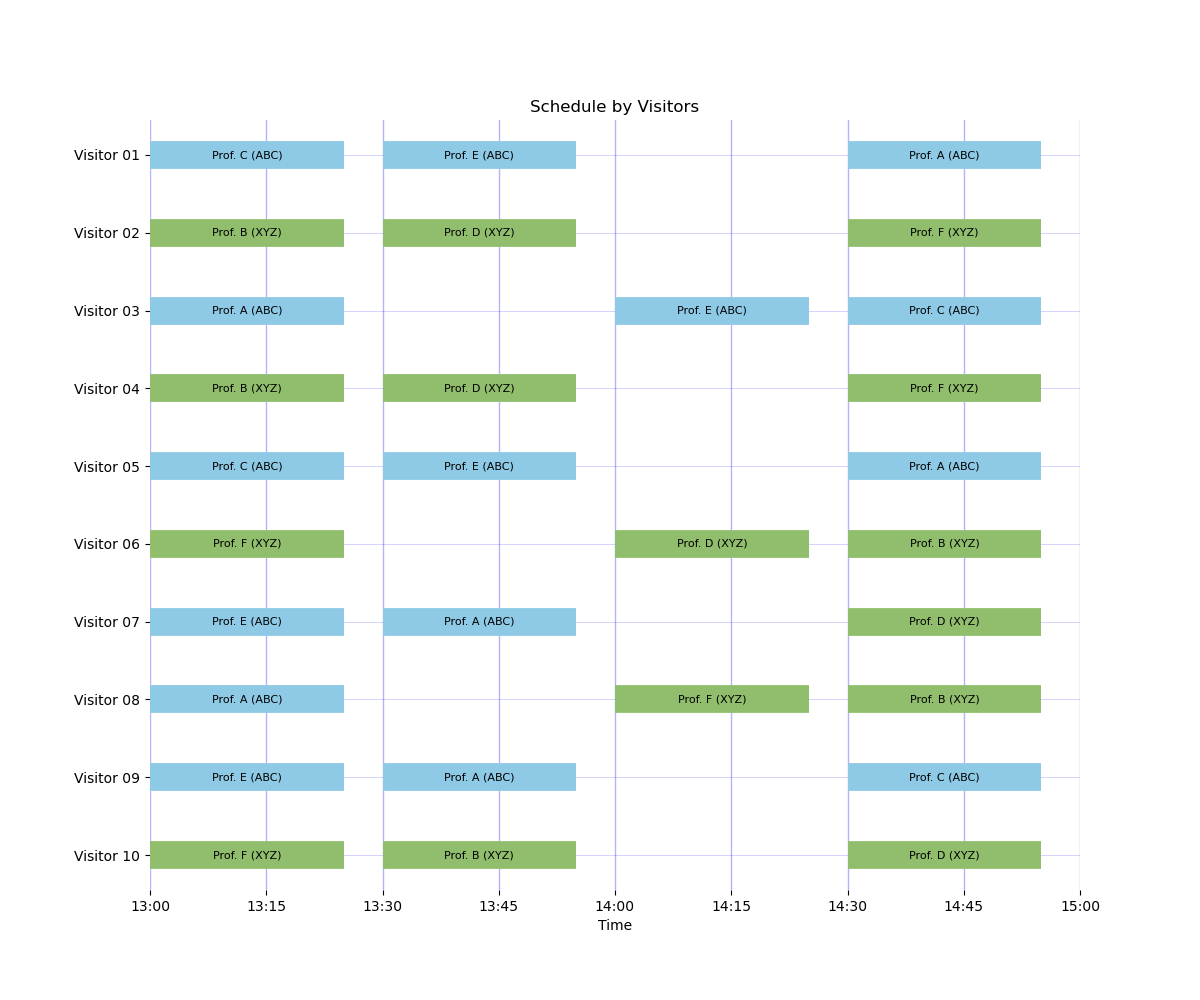
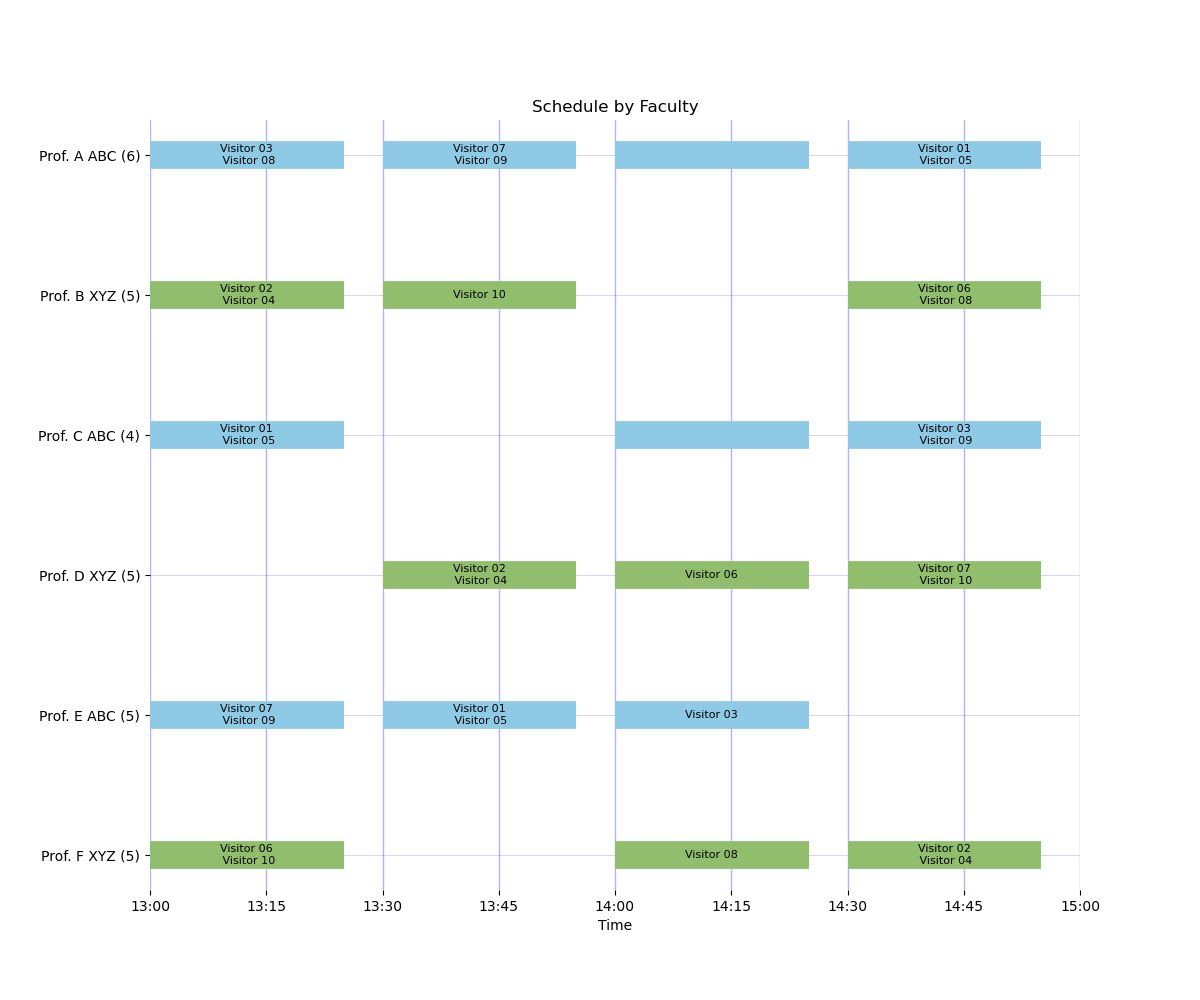
Example 2: Two nearby buildings
This is a two-building day where buildings are close enough that explicit travel lags are not modeled, which matches operations where walking time is negligible at the slot scale.
Configuration:
examples/config_two_buildings_close.yamlexamples/faculty_formulation.yaml
Result summary: feasible, objective 110.9, assignments 30, requested assignments 30, group slots 13.
Example 3: Three nearby buildings
This extends the close-building baseline to three locations and is useful when events are spread across multiple nearby spaces with effectively synchronized movement.
Configuration:
examples/config_three_buildings_close.yamlexamples/faculty_three_buildings.yaml
Result summary: feasible, objective 110.9, assignments 30, requested assignments 30, group slots 13.
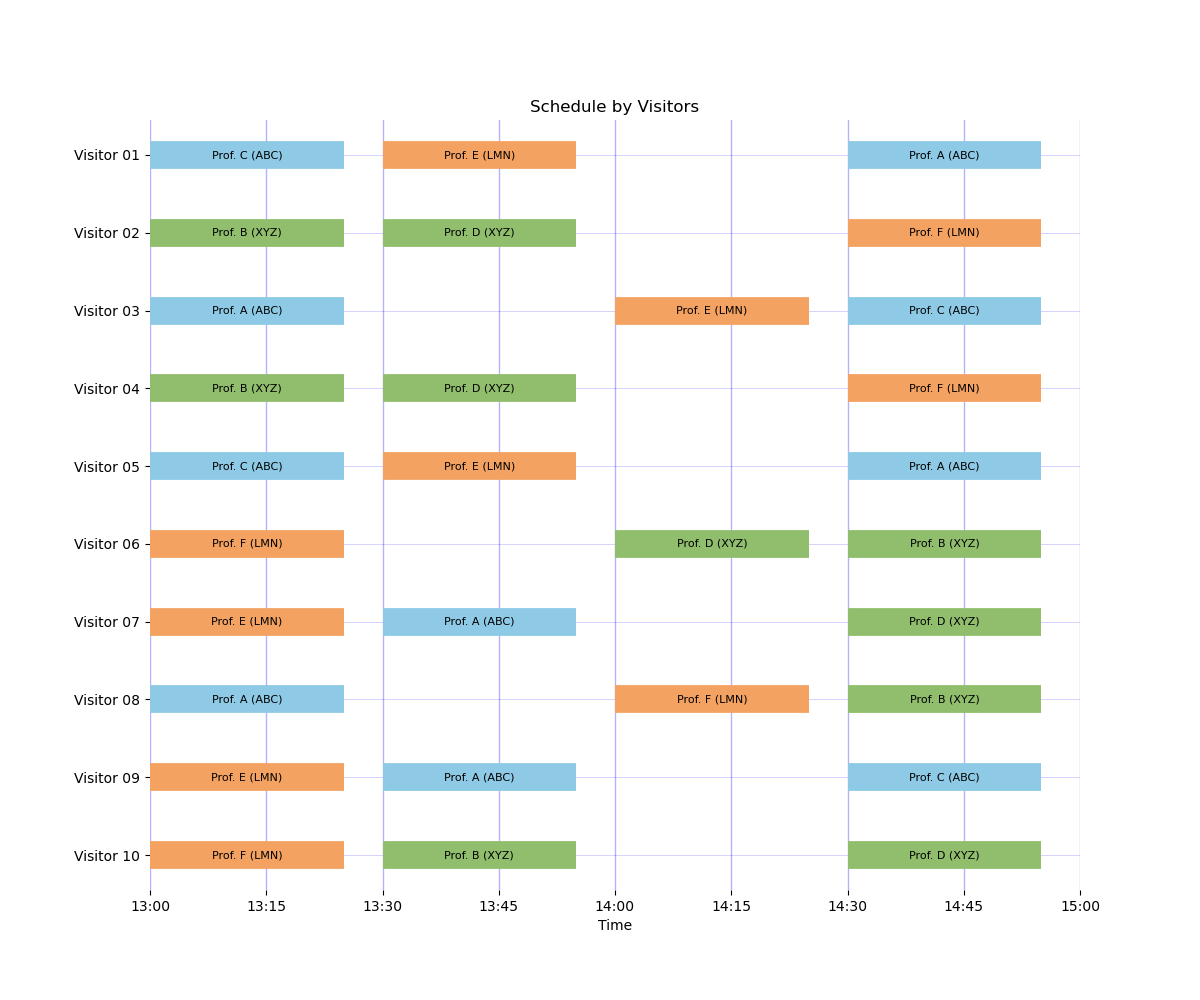
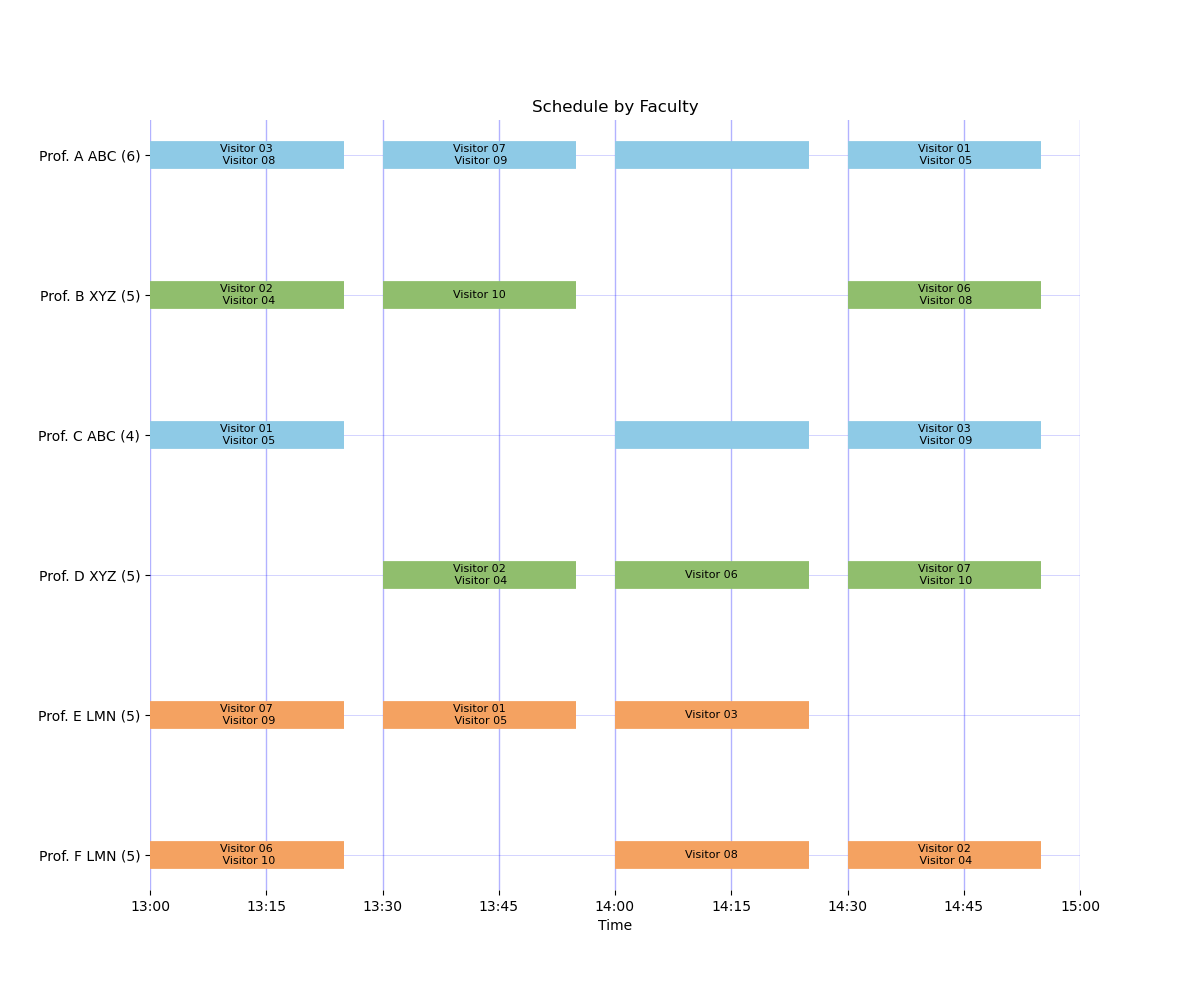
Example 4: Two buildings with one-slot travel delays
This scenario introduces explicit travel lag constraints between two buildings and represents operations where cross-building movement must consume at least one slot of separation.
Configuration:
examples/config_two_buildings_travel_delay.yamlexamples/faculty_formulation.yaml
Result summary: feasible, objective 110.9, assignments 30, requested assignments 30, group slots 13.
Example 5: Three buildings with one-slot travel delays
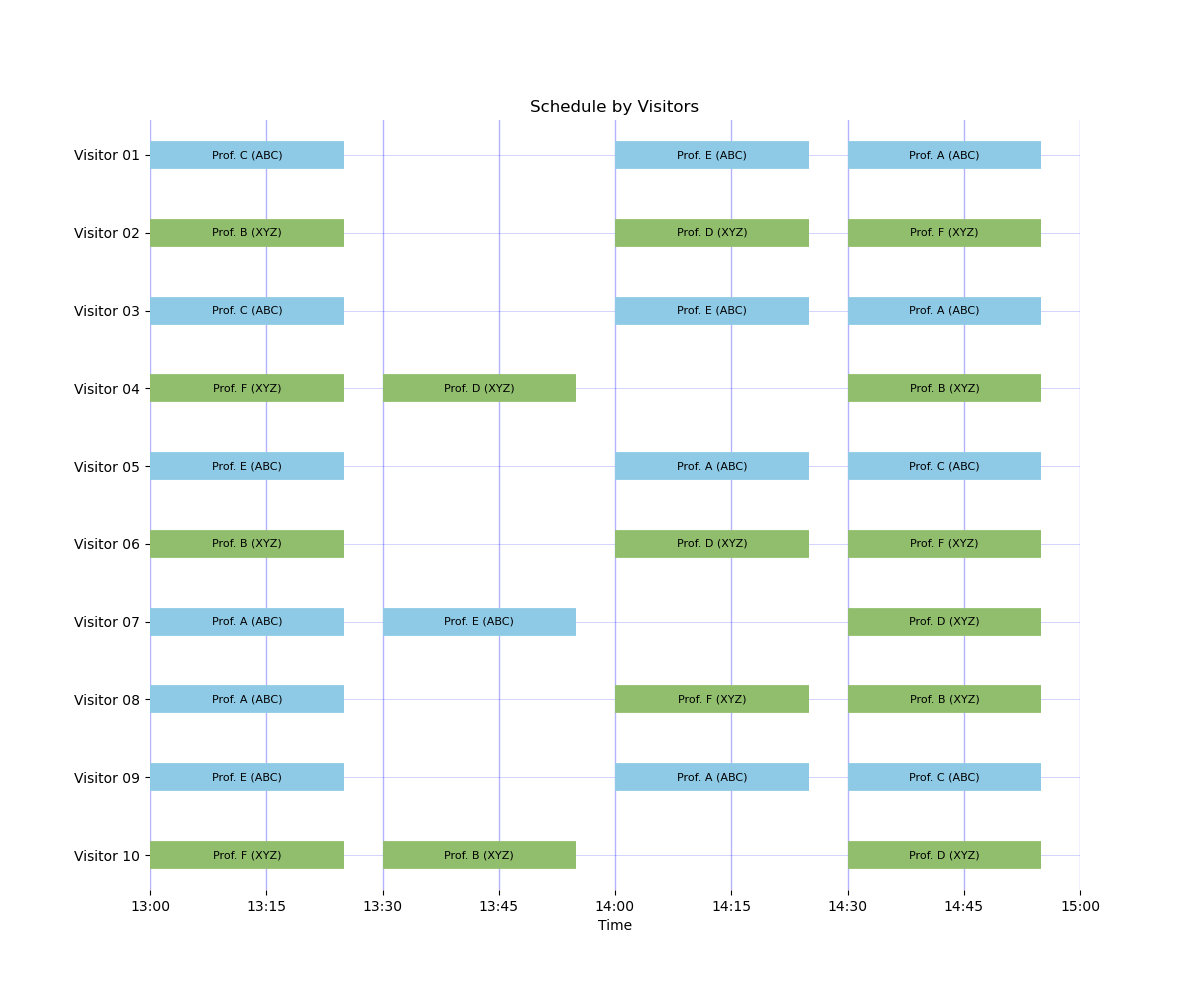
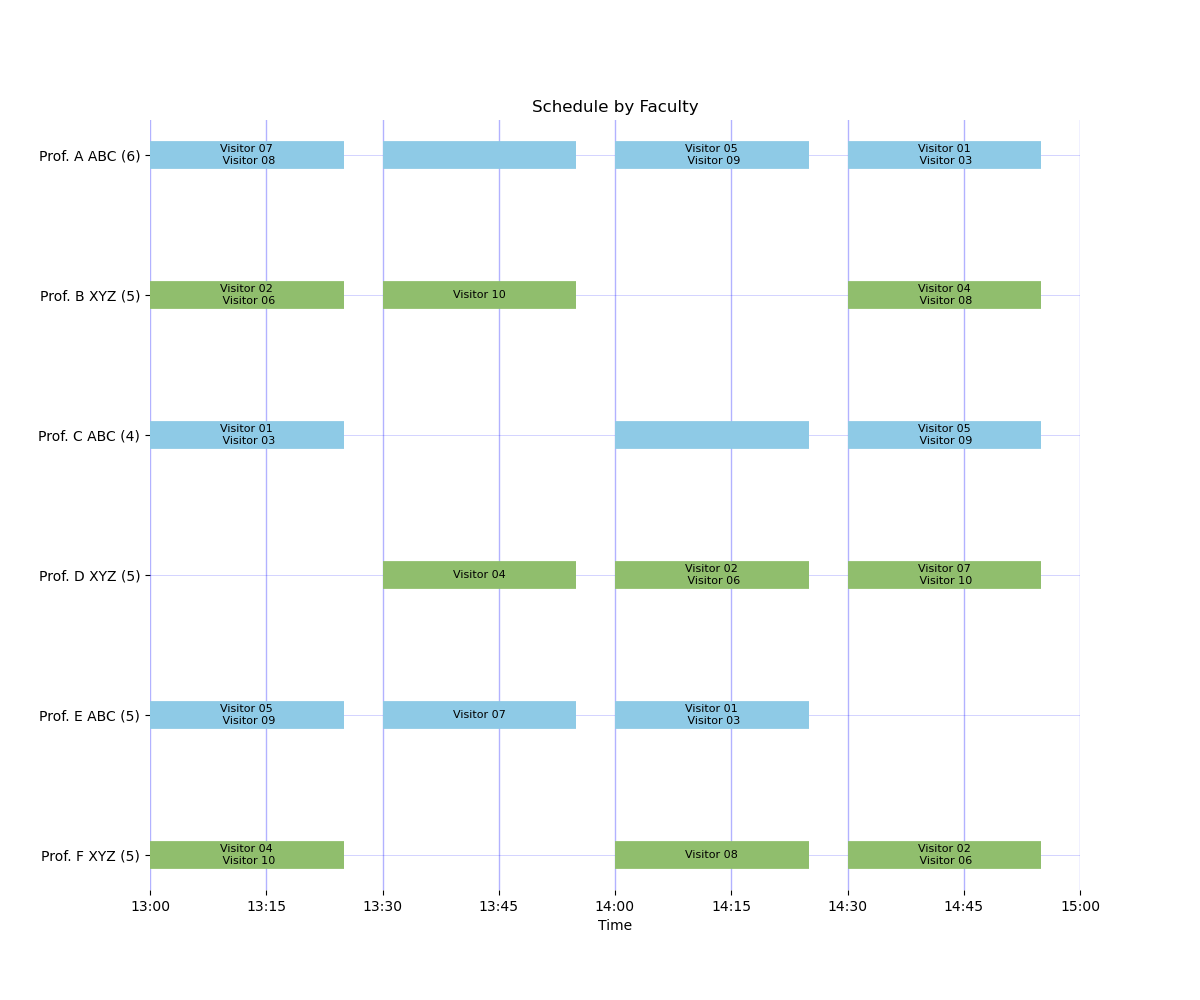
This is the strict three-building travel-lag case and reflects operations where every cross-building move needs buffer time, which can reduce achievable assignments.
Configuration:
examples/config_three_buildings_travel_delay.yamlexamples/faculty_three_buildings.yaml
Result summary: feasible, objective 103.7, assignments 28, requested assignments 25, group slots 12.
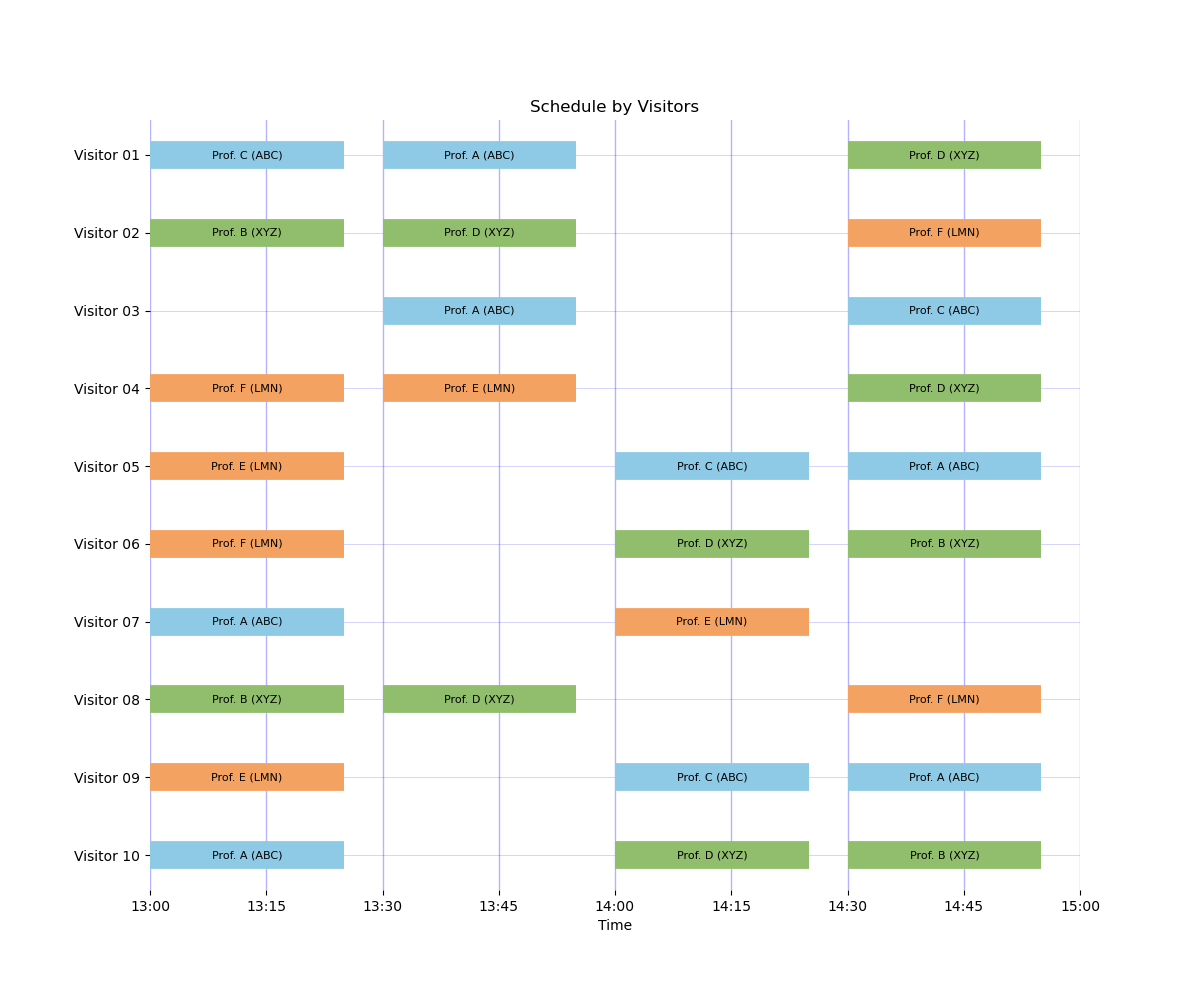
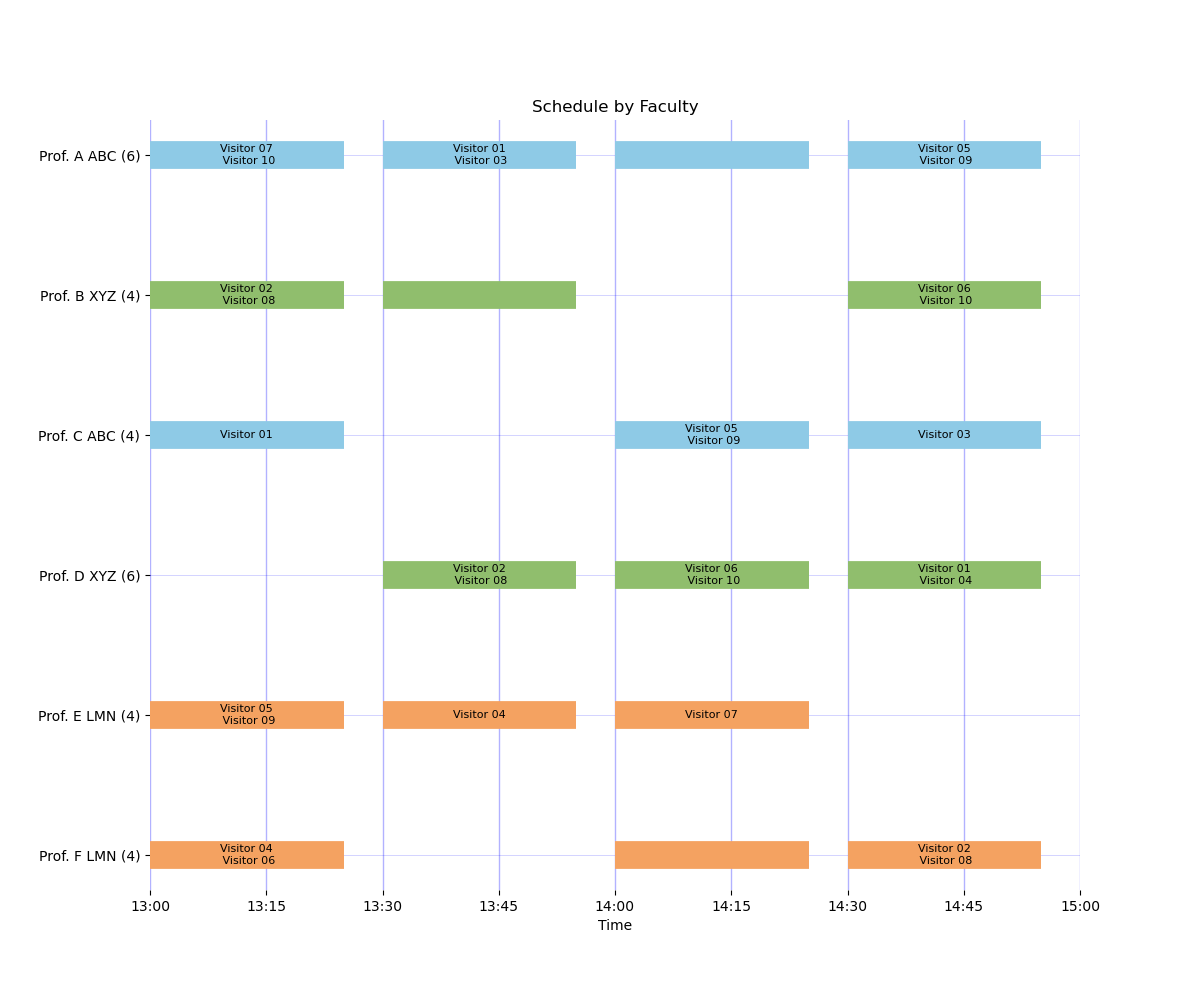
Example 6: Shifted clocks, building ABC starts 15 minutes earlier
This shifted-clock setup models operations where ABC sessions begin earlier than XYZ and movement feasibility is enforced directly from real clock times.
Configuration:
examples/config_shifted_abc_earlier_nonoverlap.yamlexamples/faculty_formulation.yaml
Result summary: feasible, objective 110.9, assignments 30, requested assignments 30, group slots 13.
Why this addresses cross-building movement without explicit break slots:
nonoverlap_timederives travel lags from absolute timestamps.Adjacent-slot transitions are allowed when the destination slot starts after the source slot ends.
That lets the model permit valid moves directly from one meeting to the next when timing permits.
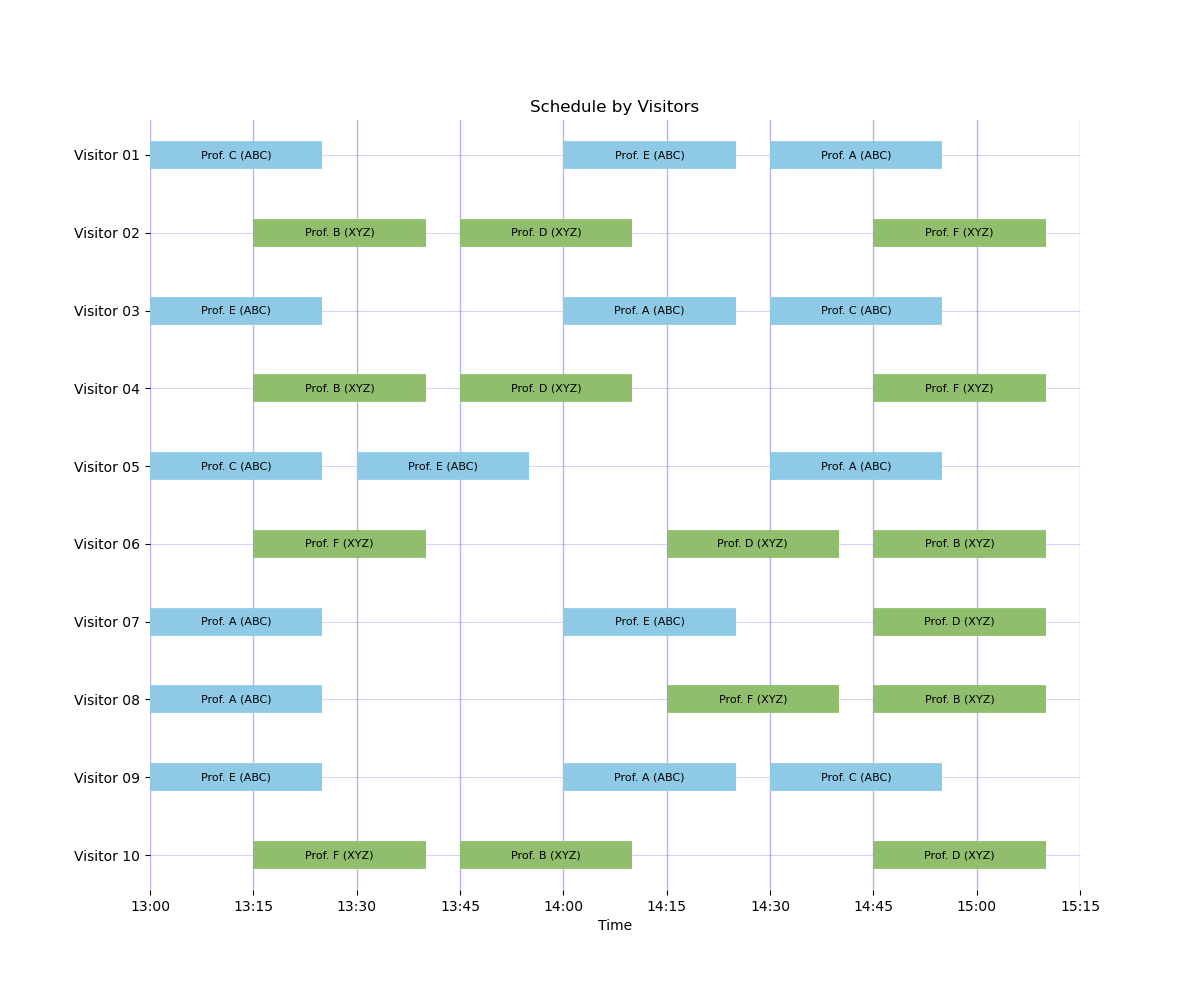
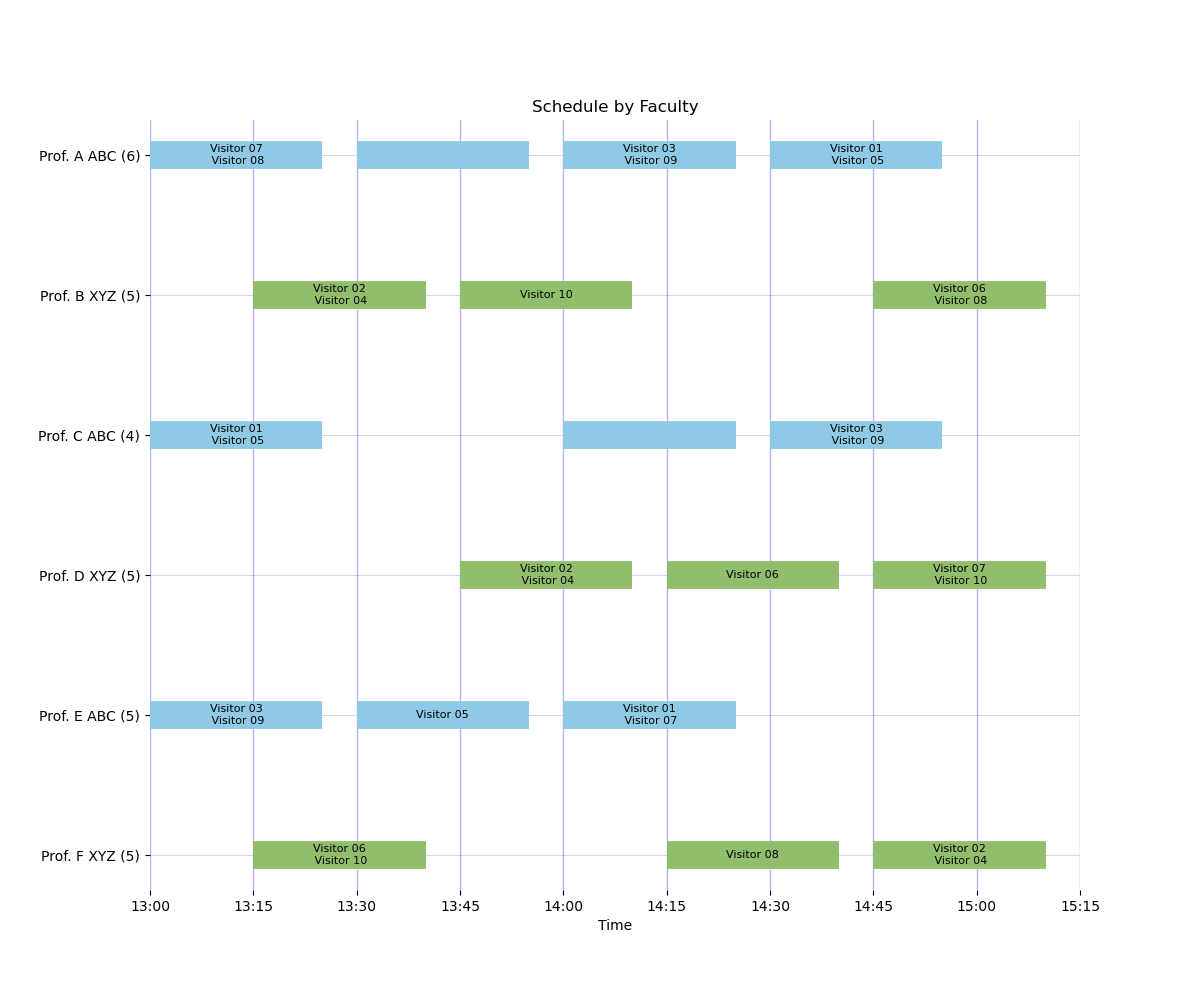
Example 7: Shifted clocks, building XYZ starts 15 minutes earlier
This is the mirrored shifted-clock case where XYZ starts earlier, useful when visitor flow or host logistics make XYZ the natural starting location.
Configuration:
examples/config_shifted_xyz_earlier_nonoverlap.yamlexamples/faculty_formulation.yaml
Result summary: feasible, objective 110.9, assignments 30, requested assignments 30, group slots 13.
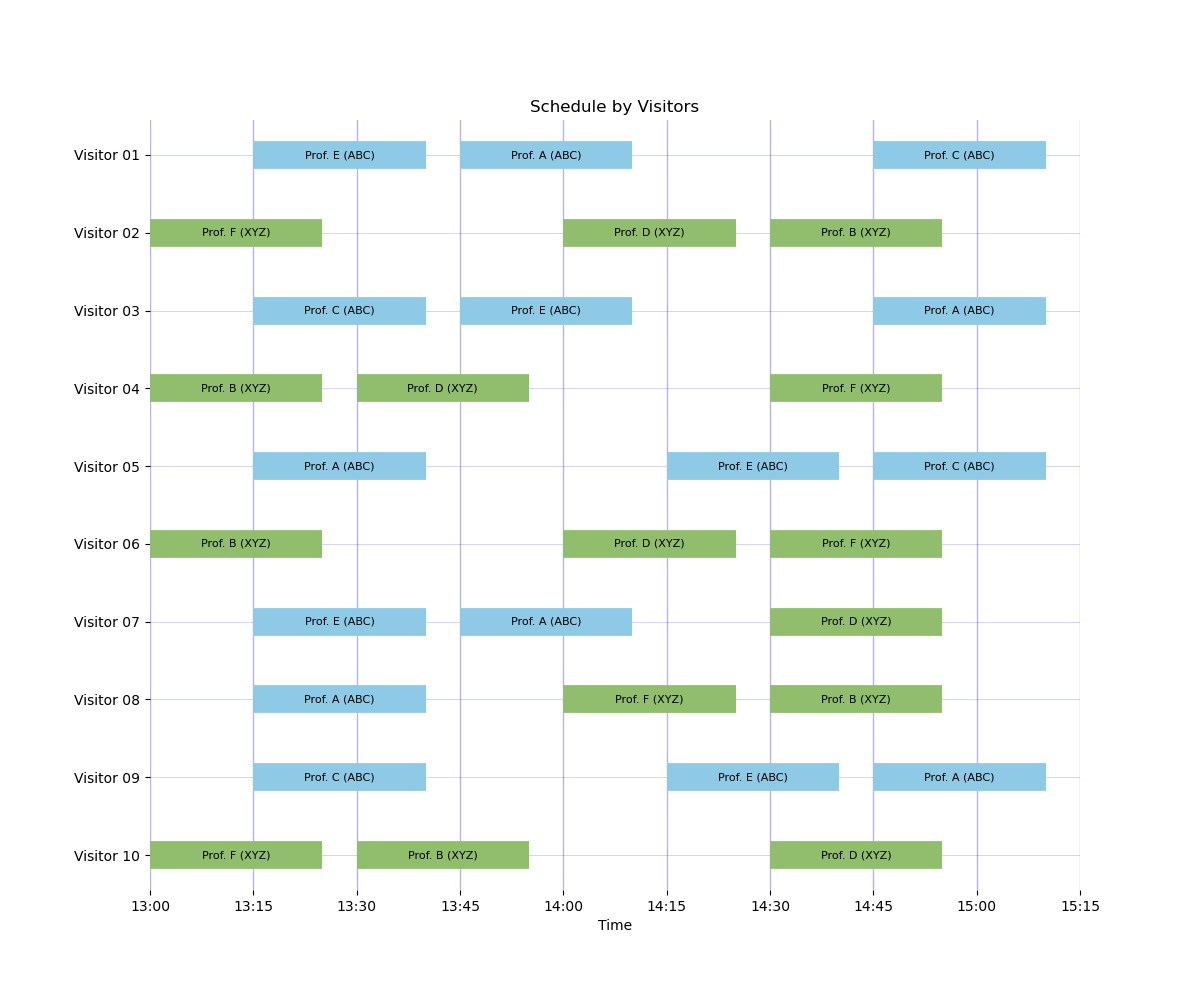
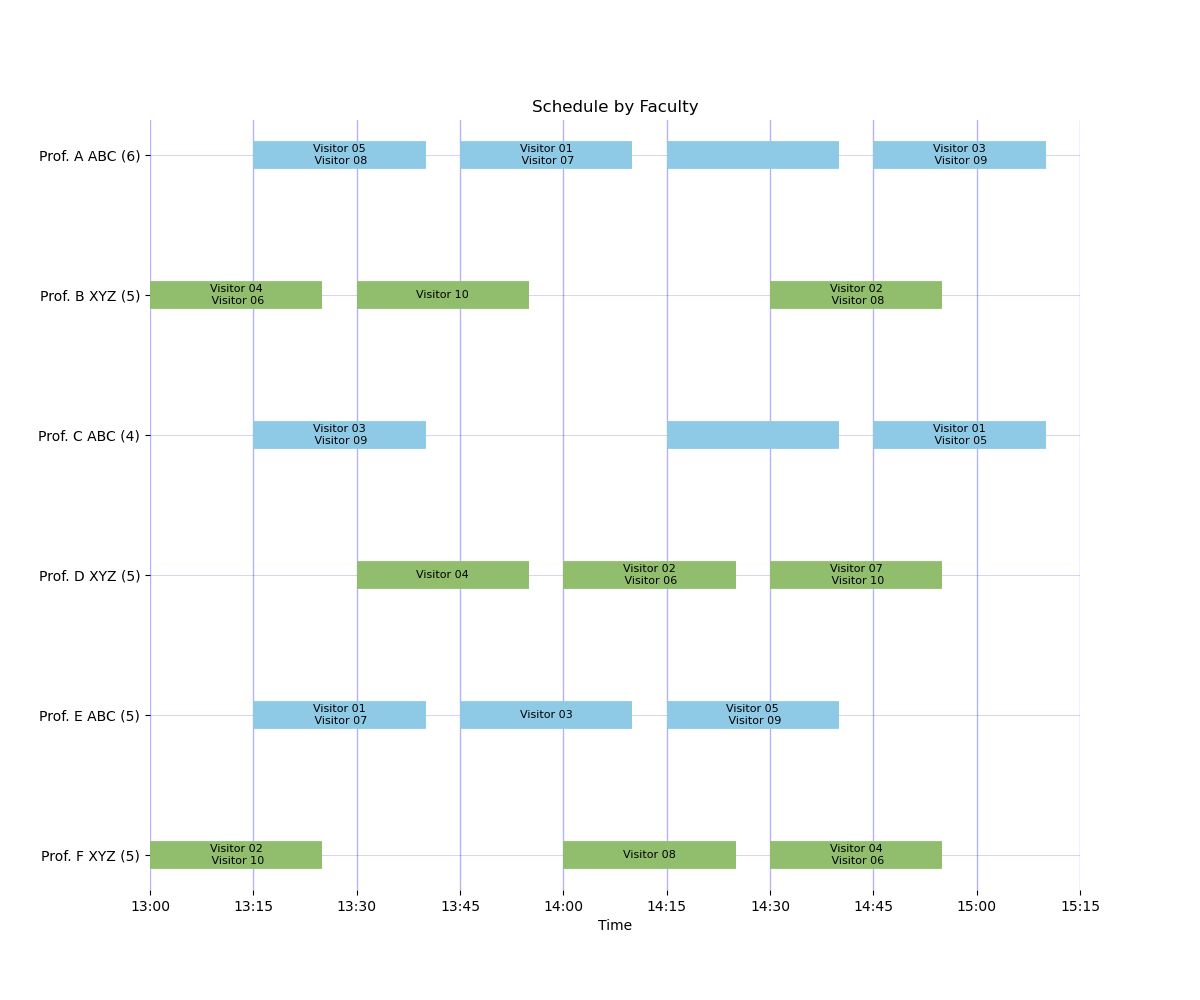
Example 8: Synced clocks, building ABC starts first
This phase-slot scenario is appropriate when visitors begin the event near ABC (for example, check-in or welcome activities in ABC), so scheduling intentionally opens ABC first.
Configuration:
examples/config_shifted_a_first.yamlexamples/faculty_formulation.yaml
Result summary: feasible, objective 101.8, assignments 26, requested assignments 26, group slots 11.
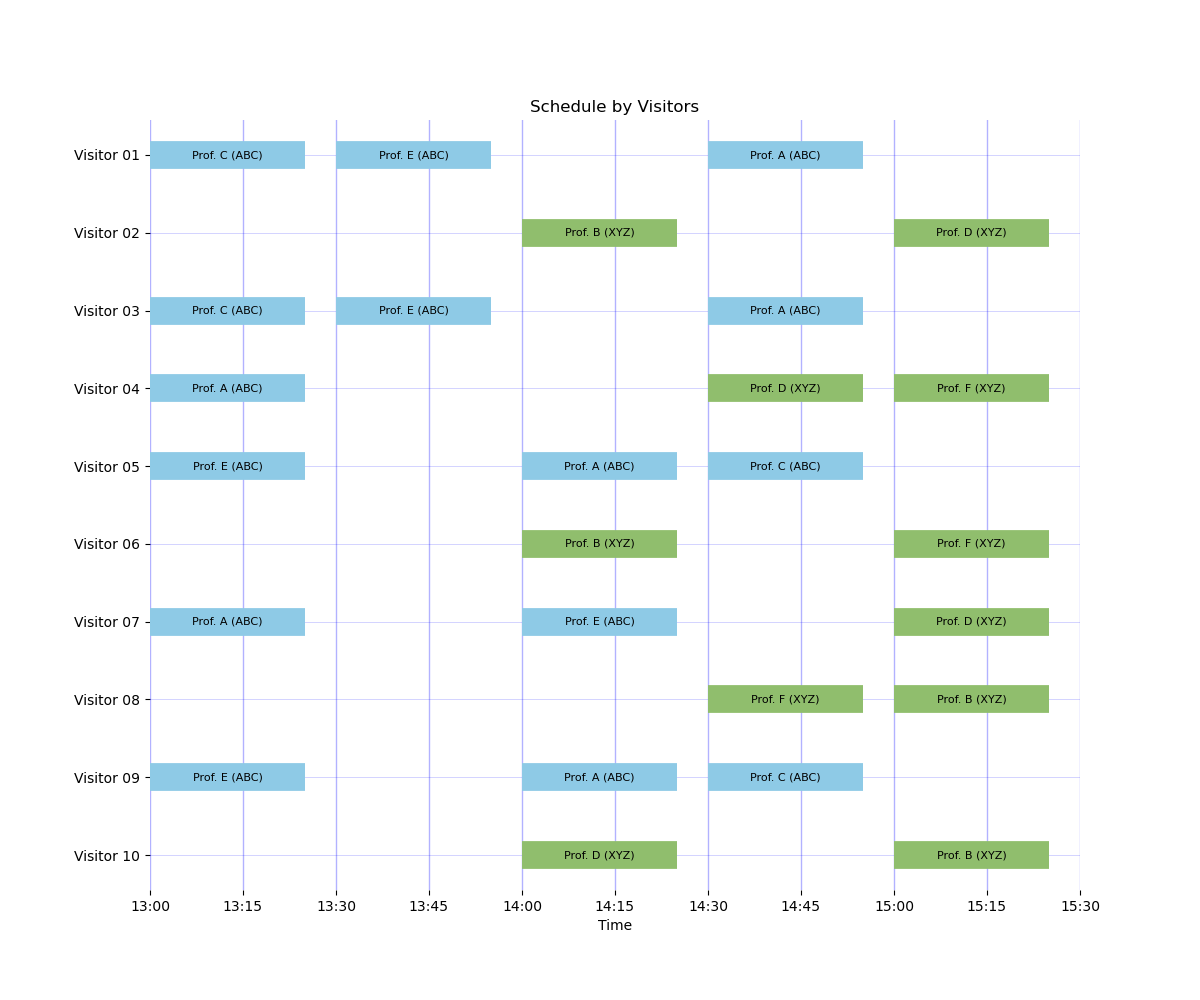
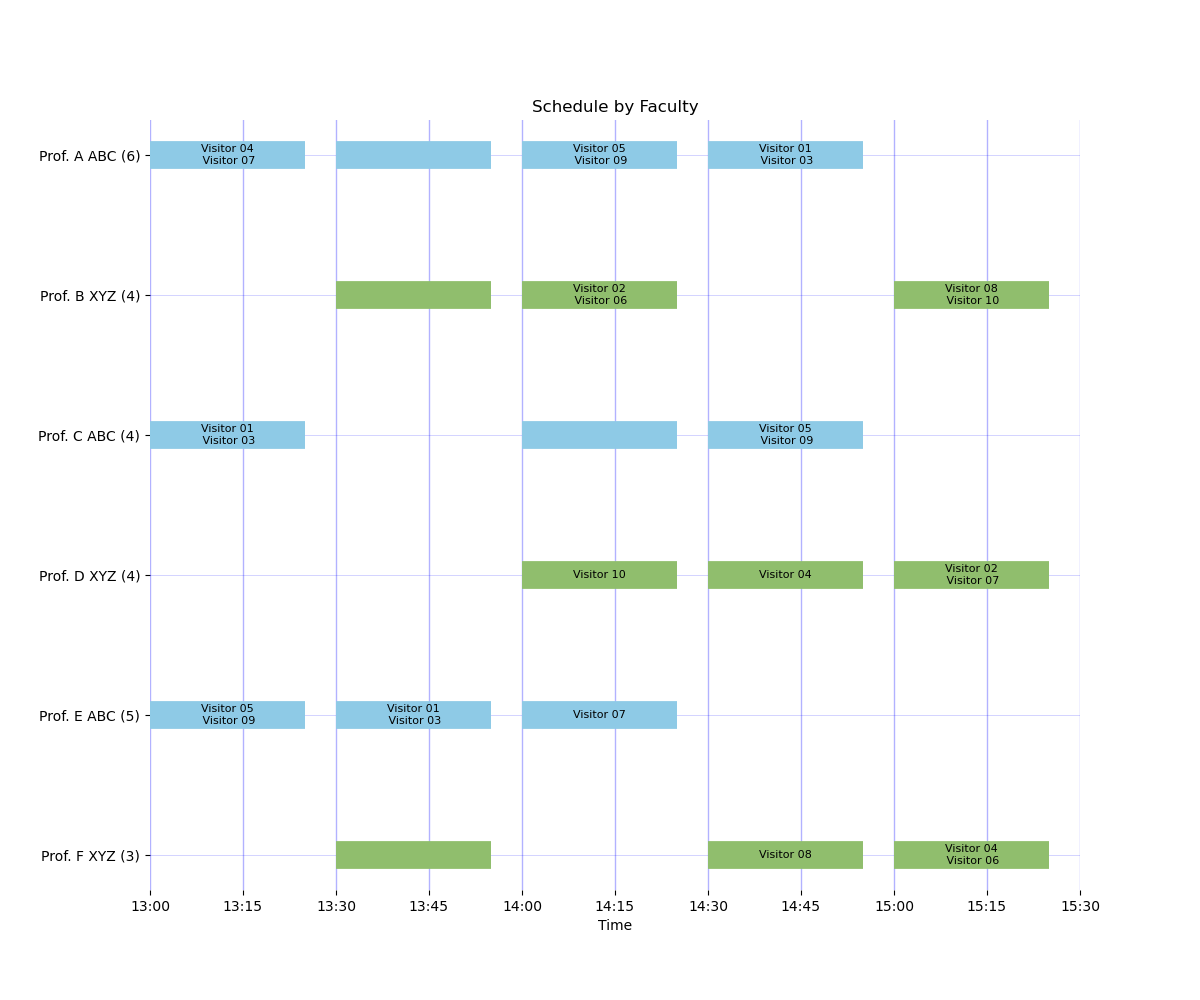
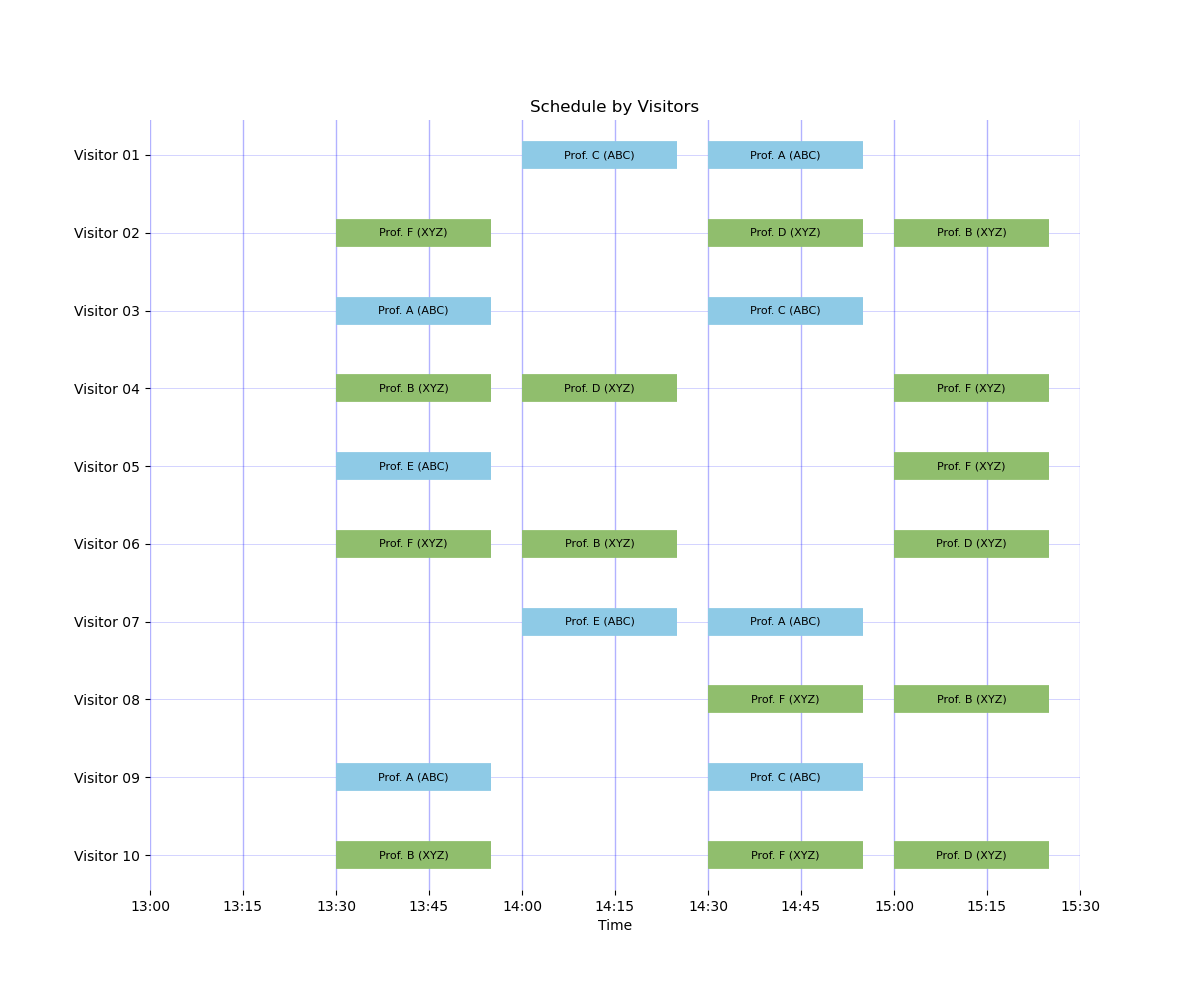
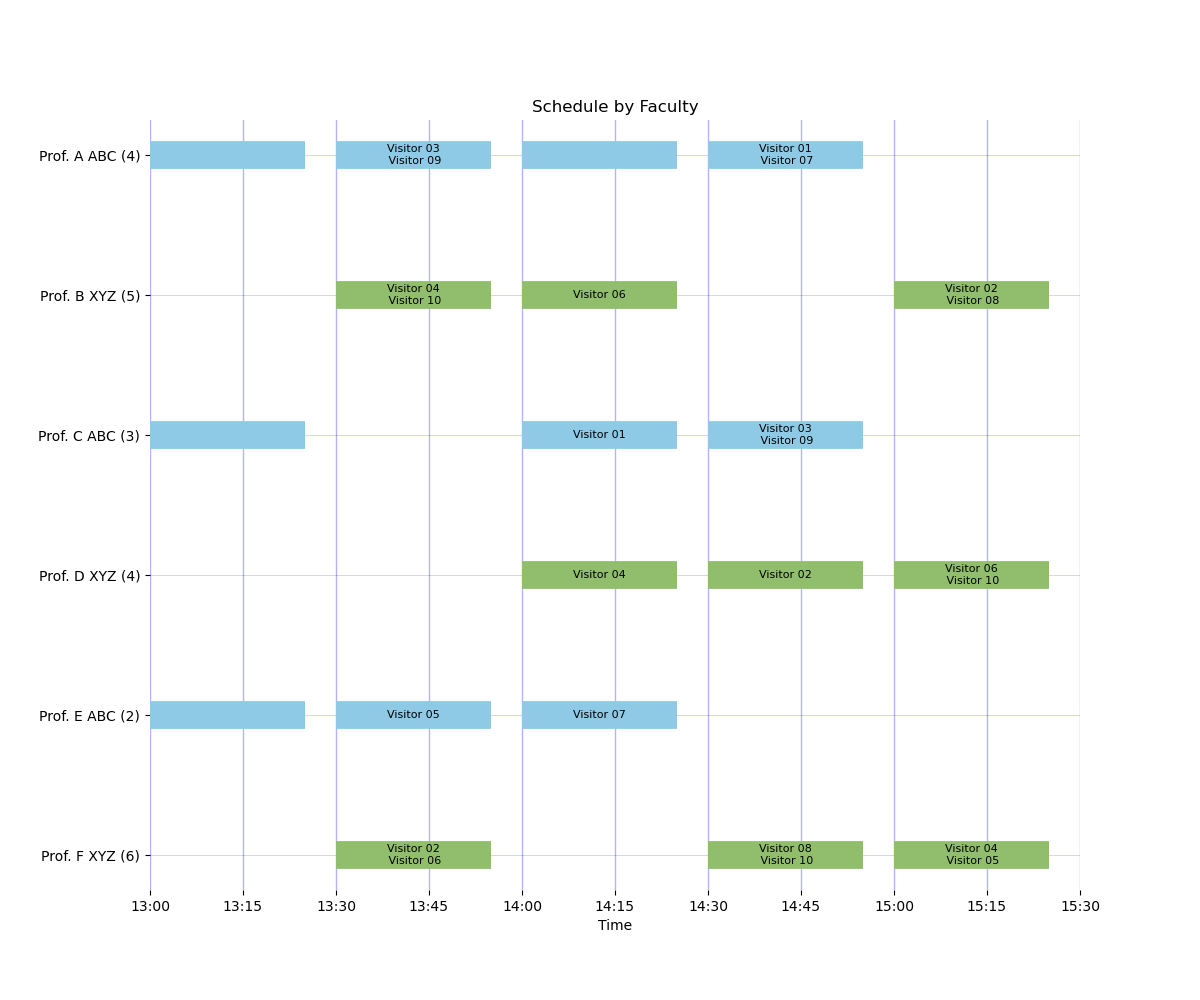
Example 9: Synced clocks, building XYZ starts first
This is the corresponding XYZ-first phase-slot variant for operations where the event begins near XYZ and initial visitor distribution favors that building.
Configuration:
examples/config_shifted_b_first.yamlexamples/faculty_formulation.yaml
Result summary: feasible, objective 94.9, assignments 24, requested assignments 23, group slots 9.
Example 10: Three buildings with shifted clocks
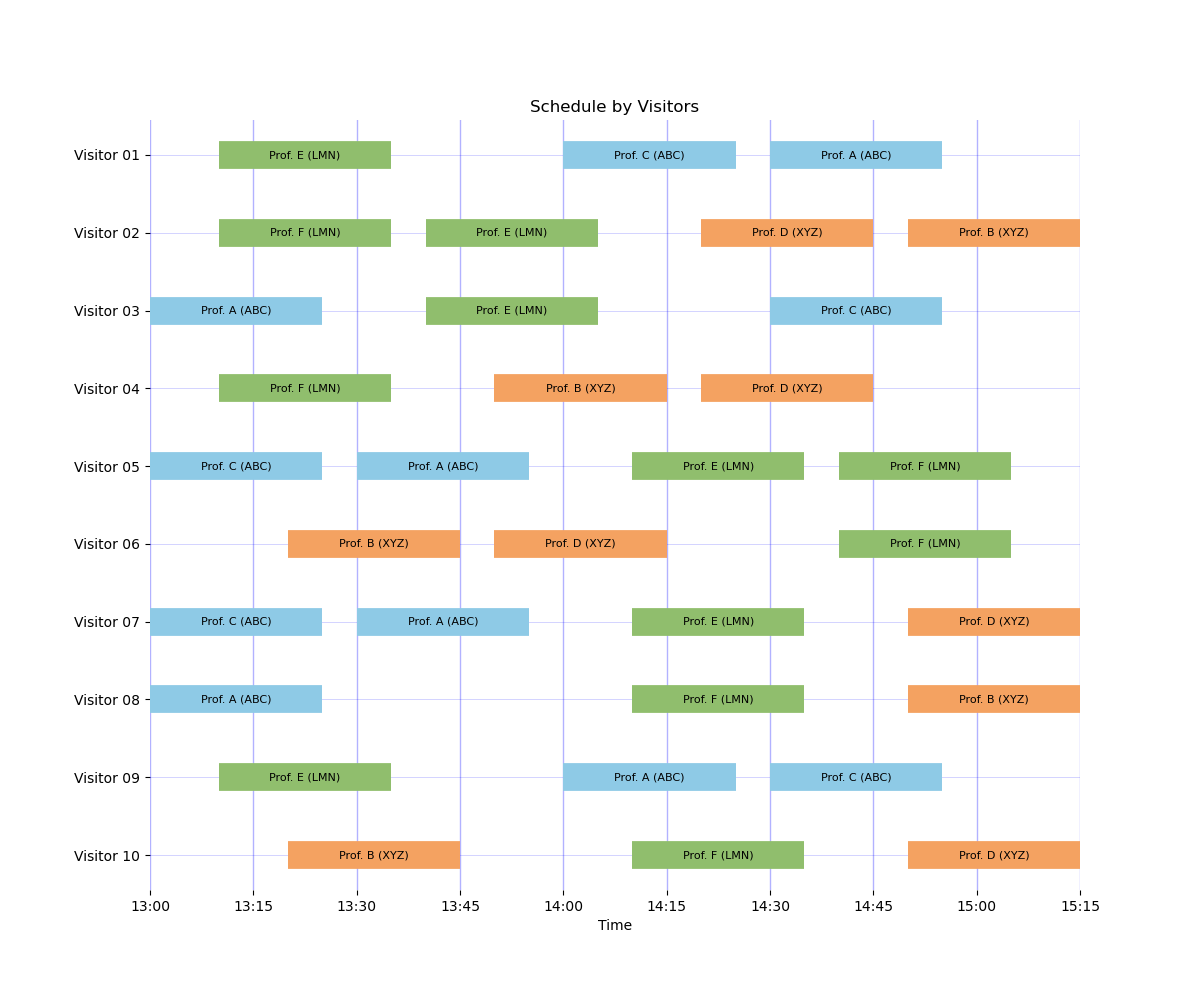
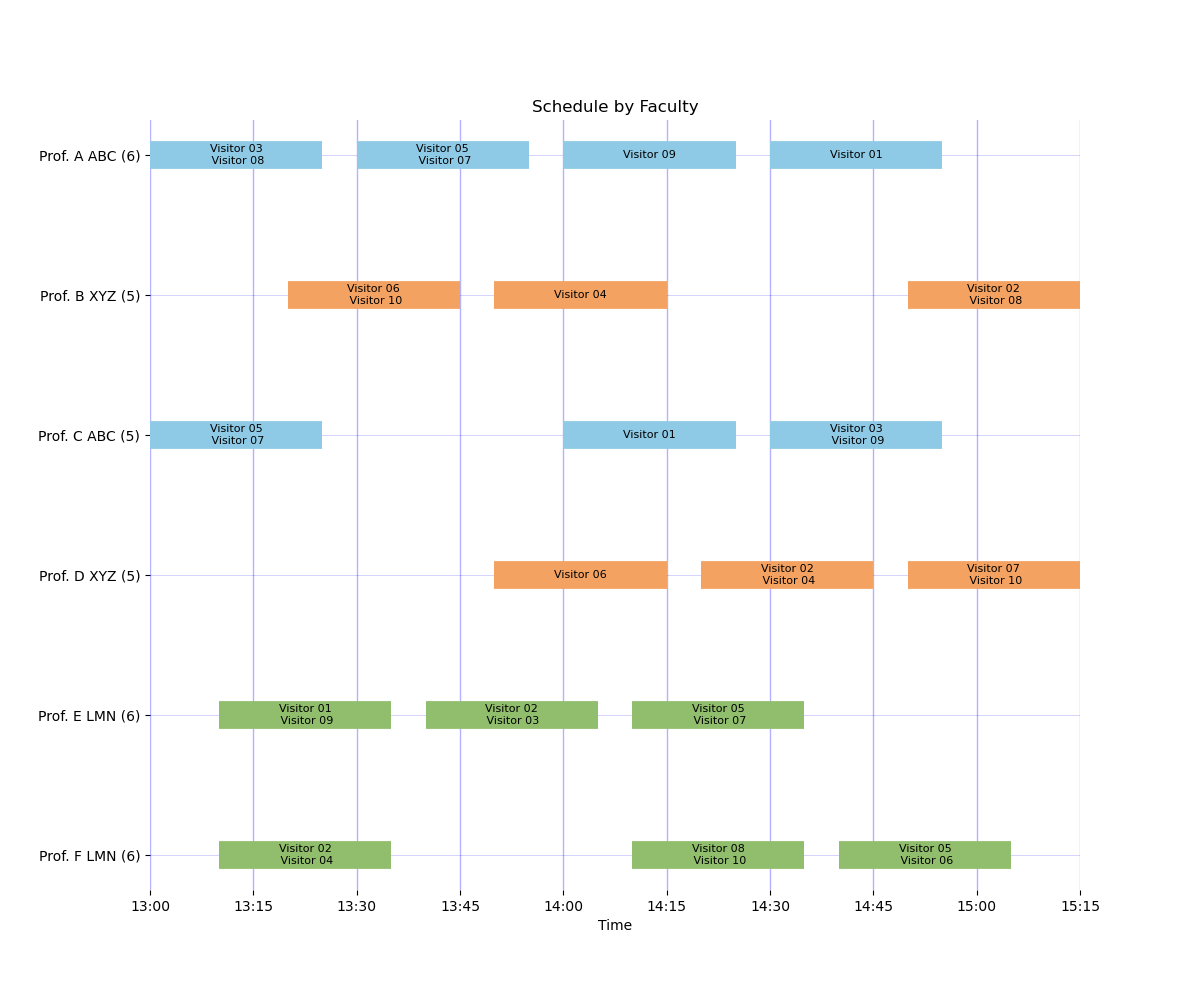
This recommended three-building shifted-clock setup models staggered time grids (ABC at :00, LMN at :10, XYZ at :20) so visitors can move between buildings without relying on dedicated break slots.
Configuration:
examples/config_three_buildings_shifted_nonoverlap.yamlexamples/faculty_three_buildings.yaml
Result summary: feasible, objective 116.1, assignments 33, requested assignments 31, group slots 14.
Why these results are sensible:
nonoverlap_timeautomatically enforces physically valid movement using absolute timestamps across all three buildings.This example intentionally has no configured breaks, which increases available meeting capacity relative to break-constrained scenarios.
The objective and assignment counts increase (vs. the baseline 30 assignments) because the model can schedule more total meetings while still respecting non-overlap travel feasibility.
Derived travel lag matrix used by the solver in this example:
ABC:
  ABC: 0
  LMN: 0
  XYZ: 0
LMN:
  ABC: 1
  LMN: 0
  XYZ: 0
XYZ:
  ABC: 1
  LMN: 1
  XYZ: 0
How to compute/inspect this in practice:
from pathlib import Path
from grad_visit_scheduler import load_run_config, build_times_by_building, compute_min_travel_lags

root = Path("examples")
cfg = load_run_config(root / "config_three_buildings_shifted_nonoverlap.yaml")
times = build_times_by_building(cfg)
lags = compute_min_travel_lags(times, min_buffer_minutes=0)
print(lags)
Legacy Mode Mappings
Legacy modes are still available with FutureWarning and map to movement configs:
Mode.BUILDING_A_FIRSTmaps topolicy: nonewithphase_slotoffset (ABC:1,XYZ:2).Mode.BUILDING_B_FIRSTmaps topolicy: nonewithphase_slotoffset (ABC:2,XYZ:1).Mode.NO_OFFSETmaps topolicy: travel_timewith a +1 inter-building lag matrix.
Break nuance:
Legacy
Mode.NO_OFFSETimplicitly enforces break constraints by default.Movement-only configs do not imply breaks; set
faculty_breaksandstudent_breaksexplicitly for the preferred interface, or use legacyenforce_breaks=Trueto request one of each.