Quickstart

This quickstart uses the larger formulation example:
examples/faculty_formulation.yaml(6 faculty:Prof. AtoProf. F)examples/config_formulation.yaml(4 meeting slots across buildingsABCandXYZ)examples/data_formulation_visitors.csv(10 visitors)
For a detailed explanation of this same example (model equations, conflicts, preferences, and solver output tables), see Mathematical Formulation. For movement policy and staggered starts, see Building Movement and Staggered Starts.
1) Understand the input files
The scheduler expects three inputs.
Faculty catalog (faculty_formulation.yaml)
faculty:
  Prof. A:
    building: ABC
    room: "201"
    areas: ["Energy", "Theory"]
    status: active
  Prof. B:
    building: XYZ
    room: "102"
    areas: ["Bio"]
    status: active
  Prof. C:
    building: ABC
    room: "203"
    areas: ["Theory"]
    status: active
  Prof. D:
    building: XYZ
    room: "104"
    areas: ["Energy"]
    status: active
  Prof. E:
    building: ABC
    room: "205"
    areas: ["Bio", "Energy"]
    status: active
  Prof. F:
    building: XYZ
    room: "106"
    areas: ["Theory", "Bio"]
    status: active

aliases: {}
Defines each faculty member’s building, room, research areas, and status.
Example statuses:
active,legacy,external.
Run config (config_formulation.yaml)
buildings:
  ABC: ["1:00 PM-1:25 PM", "1:30 PM-1:55 PM", "2:00 PM-2:25 PM", "2:30 PM-2:55 PM"]
  XYZ: ["1:00 PM-1:25 PM", "1:30 PM-1:55 PM", "2:00 PM-2:25 PM", "2:30 PM-2:55 PM"]
building_order: ["ABC", "XYZ"]
movement:
  policy: travel_time
  phase_slot:
    ABC: 1
    XYZ: 1
  travel_slots:
    ABC:
      ABC: 0
      XYZ: 1
    XYZ:
      ABC: 1
      XYZ: 0
breaks: [2, 3]

areas: ["Energy", "Bio", "Theory"]
area_weights:
  Area1: 1.0
  Area2: 0.5

faculty_availability:
  Prof. A: [1, 2, 3, 4]
  Prof. B: [1, 2, 4]
  Prof. C: [1, 3, 4]
  Prof. D: [2, 3, 4]
  Prof. E: [1, 2, 3]
  Prof. F: [1, 3, 4]
Defines slot times for two buildings.
Uses building names
ABCandXYZ.Defines break slots (
breaks: [2, 3]in this example).Defines three topic areas:
Energy,Bio,Theory.Includes per-faculty availability conflicts.
Prefer explicit slot labels such as
1:00 PM-1:25 PMor13:00-13:25. Bare labels like1:00-1:25remain supported for compatibility but emit a warning.
Visitor CSV (data_formulation_visitors.csv)
Name,Prof1,Prof2,Prof3,Prof4,Area1,Area2
Visitor 01,Prof. A,Prof. C,Prof. E,Prof. F,Energy,Theory
Visitor 02,Prof. B,Prof. D,Prof. F,Prof. C,Bio,Energy
Visitor 03,Prof. C,Prof. A,Prof. E,Prof. B,Theory,Energy
Visitor 04,Prof. D,Prof. F,Prof. B,Prof. A,Energy,Bio
Visitor 05,Prof. E,Prof. C,Prof. A,Prof. D,Bio,Theory
Visitor 06,Prof. F,Prof. B,Prof. D,Prof. E,Theory,Bio
One row per visitor.
Ranked faculty preferences in
Prof1,Prof2, …Topic areas in
Area1,Area2.
2) Build and solve
from pathlib import Path
from grad_visit_scheduler import scheduler_from_configs, Solver

root = Path("examples")

s = scheduler_from_configs(
    root / "faculty_formulation.yaml",
    root / "config_formulation.yaml",
    root / "data_formulation_visitors.csv",
    solver=Solver.HIGHS,
)

sol = s.schedule_visitors(
    group_penalty=0.2,
    min_visitors=2,
    max_visitors=8,
    min_faculty=1,
    max_group=2,
    faculty_breaks=1,
    student_breaks=1,
    tee=False,
    run_name="formulation_demo",
)

if sol is not None:
    sol.plot_faculty_schedule(save_files=True, show_solution_rank=False)
    sol.plot_visitor_schedule(save_files=True, show_solution_rank=False)
    sol.export_visitor_docx("visitor_schedule.docx")
else:
    print(s.infeasibility_report())
The Top-N workflow in section 5 uses the preferred modern SolutionSet /
SolutionResult interface for ranked schedules.
3) Key solver options
Common options on schedule_visitors(...):
group_penalty: penalizes multi-visitor meetings.min_visitors/max_visitors: faculty-level load bounds.min_faculty: minimum meetings required per visitor.max_group: cap on simultaneous visitors in one faculty meeting.faculty_breaks: minimum automatic faculty breaks. Faculty-unavailable slots outside the break window count toward this total.student_breaks: minimum automatic visitor breaks within the configured break-option slots.enforce_breaks: legacy compatibility alias for setting both counts to0or1together.tee: print solver output for debugging.
For advanced hard constraints, per-entity bounds, and debug/infeasibility workflows, see Advanced Customization.
4) Inspect and export solutions
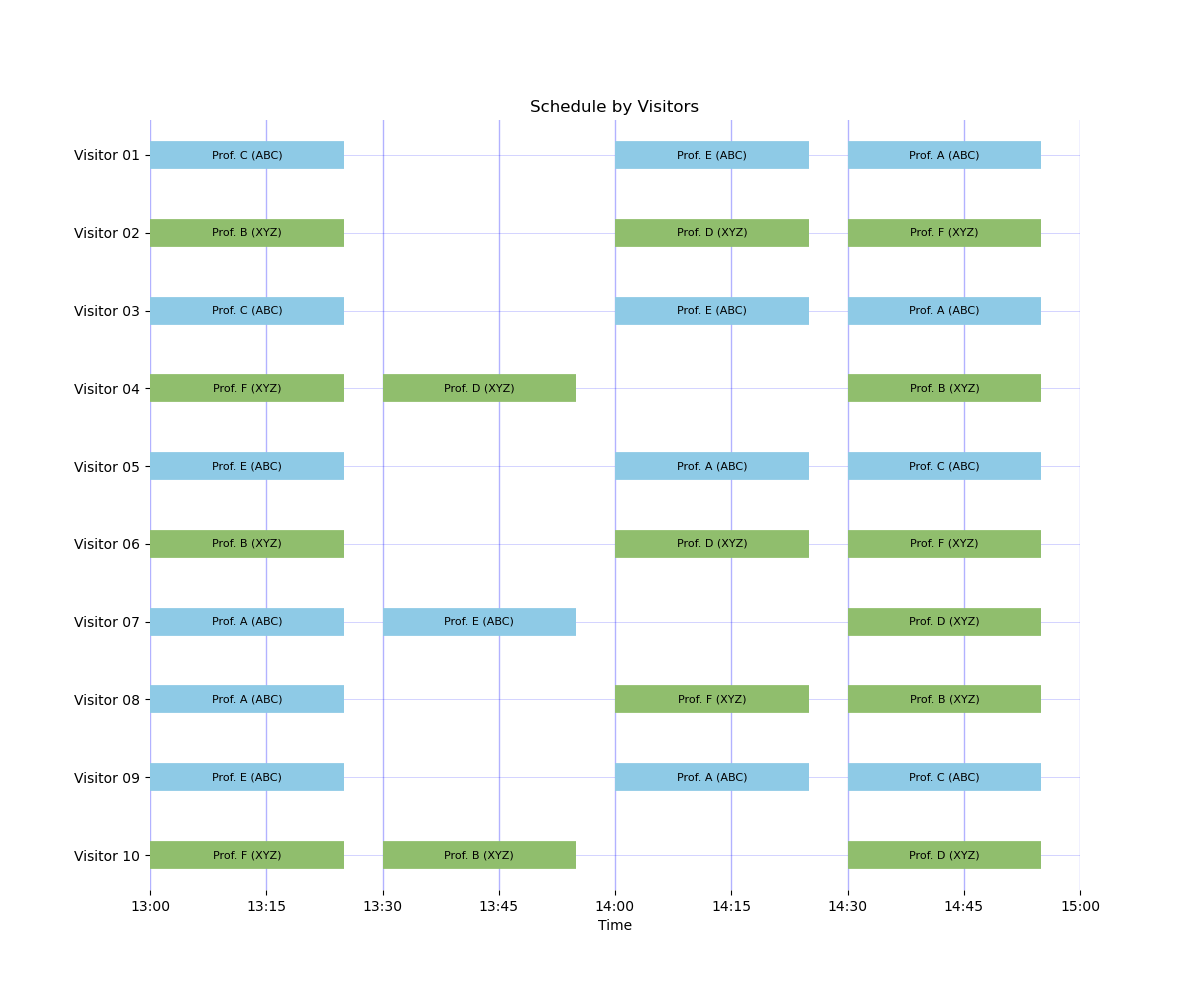
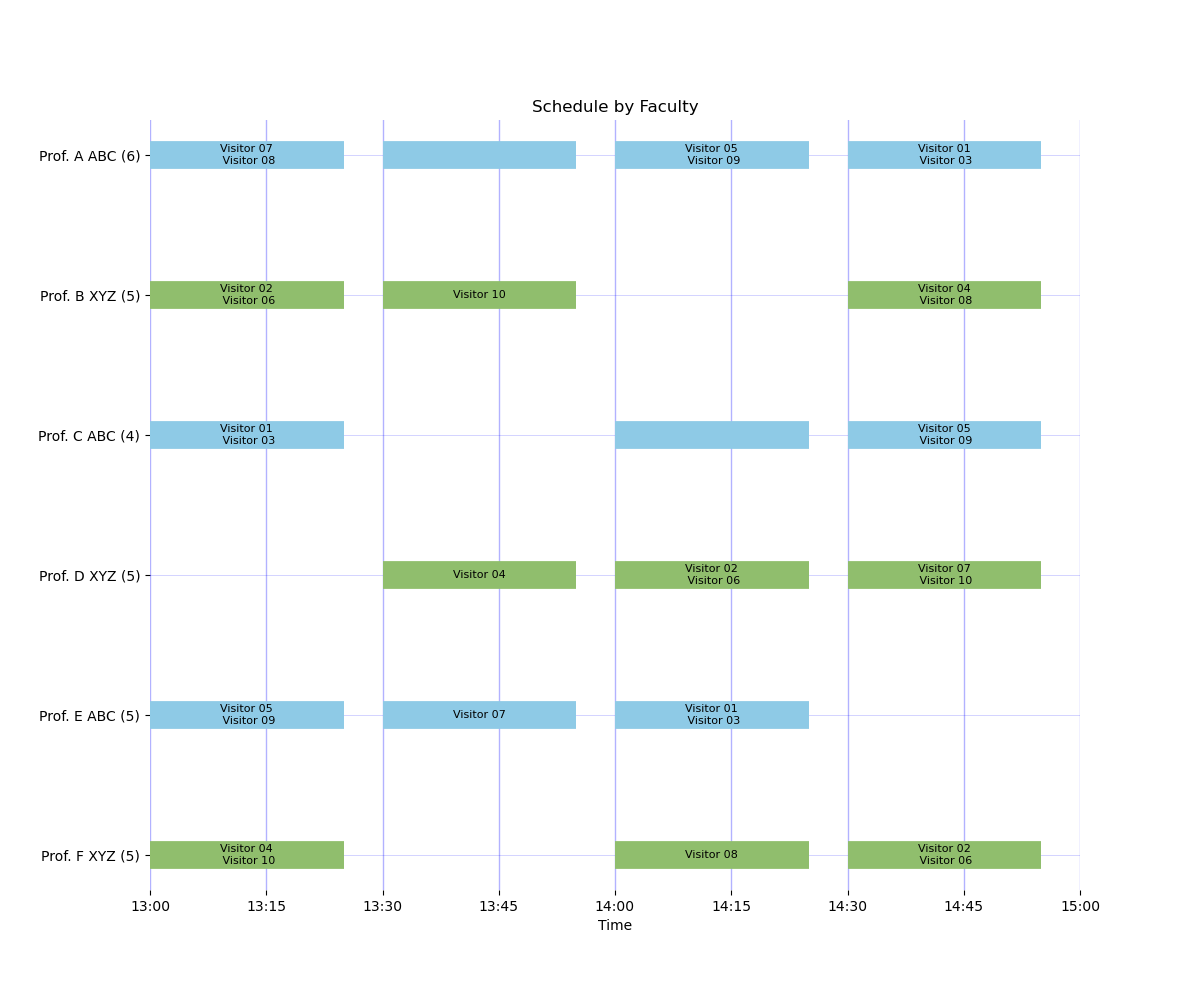
Schedule plots from this example:
How to interpret these plots:
ABCandXYZare building abbreviations fromconfig_formulation.yaml. The box color (blue versus green) also indicates the building.Visitor-view bars are labeled
Faculty (Building)for multi-building schedules and justFacultyfor single-building schedules. Missing blocks indicate breaks/travel slots.In the faculty-view y-axis labels, the number in parentheses is each faculty member’s total scheduled meetings. Single-building schedules omit the redundant building name. Missing blocks indicate faculty conflict. Blocks without a visitor name indicate a break (unused meeting).
Preferred DOCX export path:
if sol is not None:
    sol.export_visitor_docx("visitor_schedule.docx")
Legacy helper note: grad_visit_scheduler.export_visitor_docx(...) is still
available for compatibility and emits FutureWarning.
Optional diagnostics:
if s.has_feasible_solution():
    s.check_requests()
else:
    print(s.infeasibility_report())
Repository script for this same workflow:
python scripts/run_formulation_example.py
5) Generate Top-N Unique Solutions (No-Good Cuts)
Use schedule_visitors_top_n(...) to generate multiple ranked schedules.
Each additional solution is forced to differ by at least one assignment.
For the exact no-good-cut equation used in the model, see
Mathematical Formulation (“Top-N No-Good Cuts” section).
top = s.schedule_visitors_top_n(
    n_solutions=3,
    group_penalty=0.2,
    min_visitors=2,
    max_visitors=8,
    min_faculty=1,
    max_group=2,
    faculty_breaks=2,
    student_breaks=1,
    tee=False,
    run_name="formulation_top_n",
)

report = top.summarize(
    ranks_to_plot=(1, 2),
    save_files=True,
    show_solution_rank=True,  # turn off for external-facing plots
    plot_prefix="formulation_top_n",
)

summary = report["summary"]
compact = report["compact"]
print(summary)
print(compact)

if len(top) > 0:
    top.export_visitor_docx("visitor_schedule_rank1.docx", rank=1)
Developer note: if n_solutions exceeds the number of unique feasible
schedules, top contains all feasible unique schedules found, and the
Scheduler object remains at the last feasible loaded solution state.
Repository script for this workflow:
python scripts/run_top_n_example.py
6) Staggered Building Starts (A First vs B First)
Use movement.phase_slot in run configs to compare staggered starts.
Repository examples:
examples/config_shifted_a_first.yamlexamples/config_shifted_b_first.yamlexamples/faculty_formulation.yamlexamples/data_formulation_visitors.csv
Comparison runner:
python scripts/run_building_configuration_examples.py --slugs staggered_a_first staggered_b_first
For full movement-policy details (one/two/three-building cases and travel-time constraints), plus visual example outputs and result tables, see Building Movement and Staggered Starts.
For shifted-clock schedules where you want automatic overlap protection, see:
examples/config_shifted_nonoverlap_auto.yaml